

secure remote IT support for modern workplaces
deploy and configure microsoft intune remote help
Today's workforce operates across offices, homes, and remote locations, yet many organizations still rely on outdated IT support tools that require VPN access, elevated permissions, or third-party software that may not align with modern security standards. These limitations slow down issue resolution, increase risk, and make it harder for IT teams to support users wherever they work. Microsoft Intune Remote Help provides a secure, cloud-based way to deliver real-time assistance while keeping access controlled, auditable, and aligned with Zero Trust principles.
Secure remote IT support for modern workplaces with Microsoft Intune Remote Help
What is Microsoft Intune Remote Help and why it matters
Microsoft Intune Remote Help is a secure, cloud-based remote support solution built into the Microsoft Intune ecosystem that allows IT teams to connect with end users in real time to troubleshoot issues, guide them through fixes, or take control of devices when needed. It uses Microsoft Entra ID for authentication and integrates with Intune's device management and security policies, ensuring every session is tied to verified users and managed devices. This helps organizations reduce resolution times, maintain consistent support experiences, and address security concerns around remote access while keeping all activity controlled and auditable.
What can you do with Microsoft Intune Remote Help?
Microsoft Intune Remote Help is designed to give IT teams the tools they need to support users quickly, securely, and with clear controls in place. Each feature focuses on balancing real-time assistance with strong identity verification, device awareness, and role-based access. This allows organizations to deliver effective remote support without expanding risk or adding operational complexity.
Secure, identity-based access
Remote Help requires both the helper and the end user to sign in with corporate Microsoft credentials. This ensures only authorized staff can provide support and that every session is linked to a verified identity.
Role-based support permissions
IT leaders can define exactly what support staff are allowed to do. Some users can view screens and guide employees. Others can take full control when deeper troubleshooting is required. This keeps access aligned with job responsibilities.
Device compliance awareness
Before a session begins, Remote Help checks whether the device meets company policies. If the device is not compliant, the helper is alerted. This prevents risky access to unmanaged or vulnerable endpoints.
Privileged task support
With the right permissions, helpers can perform actions that require administrative approval. This includes entering UAC credentials to install software or change system settings while the user remains present.
Real-time chat and screen annotation
Support sessions include built-in chat and visual tools that let helpers guide users through steps clearly. This improves communication and speeds up issue resolution.
Session logging and auditing
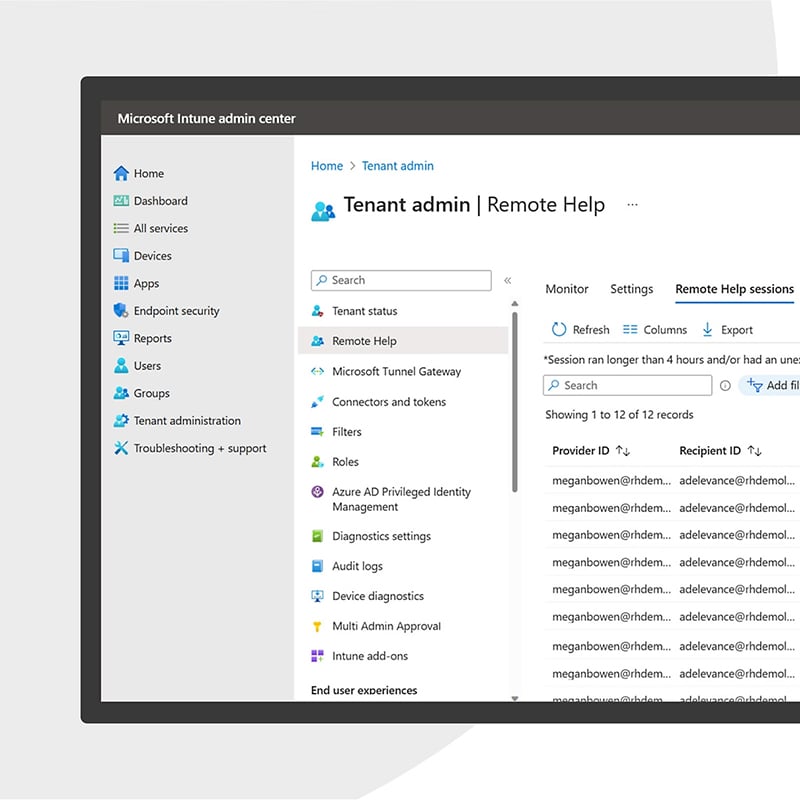
Every session is recorded in Intune's reporting tools. IT leaders can review who provided support, when it happened, and what device was involved. This supports compliance and accountability.
Cross-platform coverage
Remote Help supports Windows, macOS, and Android devices. IT teams can assist users across the environments most organizations already rely on.
Ready to learn more? Discover how to deploy and configure Microsoft Intune Remote Help
Work with our Microsoft Intune consultants to deploy and configure Remote help in a way that aligns with your security policies, support workflows, and business goals. We help you set up role-based access, device compliance checks, and secure support processes so your IT team can assist users quickly without introducing unnecessary risk.
How can Microsoft Intune Remote Help help your organization?
Reduce downtime and keep employees productive
When technical issues stop employees from working, every minute counts. Remote Help allows IT teams to connect instantly and resolve problems without requiring in-person visits or complex setup steps. Faster fixes mean less disruption to daily operations.
Improve security without slowing support
Remote Help follows Zero Trust principles by verifying identities, checking device compliance, and limiting permissions based on role. IT teams can provide effective support while the business maintains strong security standards.

Simplify IT operations
Because Remote Help is built into Microsoft Intune, there is no need to manage separate remote support tools. IT teams can centralize device management, security policies, and support workflows in one platform, reducing complexity and operational overhead.
Dive deeper into the Intune family
Securely manage devices, enforce compliance policies, and protect corporate data across endpoints.
Our consulting services related to Microsoft Intune
We offer assessments, engagements, design and configuration, and more. Each resulting in a roadmap to success for your digital transformation.
How we're different
Recognitions and certifications
Synergy Technical has been accredited with several partner recognitions.
Microsoft FastTrack Ready Partner
FastTrack is a combination of resources, engineering expertise, and best practices that ensures you have the most efficient deployment and adoption possible.
Microsoft Security Workshop Partner
As a leading Microsoft Security Workshop partner, we help organizations assess their environments and strengthen protection using Microsoft's productivity and security solutions.
Microsoft Cloud Solutions Partner
Subject matter experts in Modern Work for Enterprise and SMB, cybersecurity architecture, identity and access management, information protection, and additional specializations.
Our proven experience
- Deployed over 20M seats of Office 365, Microsoft 365, and Microsoft EMS
- Customers in all 50 states
- Experience in 70+ countries

Ready to get started?
Contact us today and we can help by offering the following:
- Schedule a free interactive demo
- Conduct a proof of concept
- Deploy and configure Microsoft Intune Remote Help and enable secure, real-time IT support for employees while keeping access controlled, auditable, and aligned with Zero Trust.