

Microsoft EMS combines identity, device, and data protection to support secure and flexible work

A female IT employee consults with her male counterpart on how Microsoft Intune through Microsoft Enterprise Mobility + Security can help their organization manage devices more efficiently and enforce consistent security policies.

What is Enterprise Mobility + Security and why it matters


Microsoft Enterprise Mobility + Security (EMS) is an integrated suite of identity, endpoint management, and information protection solutions designed to help organizations secure modern work environments.

It brings together key Microsoft security technologies into a unified platform that enables IT and security teams to:

  • Control access to applications and data based on identity and risk
  • Manage and secure devices across operating systems and locations
  • Protect sensitive information wherever it travels
  • Detect and respond to threats using intelligent insights

EMS is built on a Zero Trust approach—verifying every user, device, and access request before granting access—while still enabling a seamless experience for employees.

Business challenges EMS solves

 
  • Lack of visibility into who is accessing corporate resources

  • Difficulty managing remote and hybrid work environments

  • Increased risk from compromised identities and credentials

  • Inconsistent device security across personal and corporate devices

  • Data leakage across cloud apps, endpoints, and collaboration tools

  • Siloed security tools that slow down response times

EMS helps organizations move from reactive security to a more proactive and identity-driven security posture.

IT employees use the security capabilities within Microsoft Enterprise Mobility + Security to help their organization protect sensitive data, improve visibility, and strengthen control across users, devices, and apps.

What can you do with Microsoft Enterprise Mobility + Security?

These Microsoft EMS features work together to strengthen security, improve visibility, and give organizations better control across the modern workplace:

Identity and access management with Microsoft Entra ID

Control who can access your environment and under what conditions.

  • Enable single sign-on (SSO) across cloud and on-prem applications
  • Enforce multifactor authentication (MFA) and conditional access
  • Detect and respond to identity-based risks in real time
  • Support passwordless authentication for stronger security
Learn more about Microsoft Entra ID, Microsoft Entra multifactor authentication, or Microsoft Entra Conditional Access.

Endpoint management with Microsoft Intune

Manage and secure devices from a single, cloud-based platform.

  • Enroll and manage Windows, macOS, iOS, and Android devices
  • Enforce compliance policies across corporate and BYOD devices
  • Deploy applications and updates remotely
  • Enable secure access to company resources without compromising user experience
Learn more about Microsoft Intune.

Information protection with Microsoft Purview Information Protection

Protect sensitive data wherever it lives or travels.

  • Classify and label sensitive information automatically
  • Apply encryption and usage restrictions to files and emails
  • Maintain visibility and control over data across environments
  • Support compliance with regulatory and internal data policies
Learn more about Microsoft Purview Information Protection. 

Cloud app security with Microsoft Defender for Cloud Apps

Gain visibility and control over cloud applications and shadow IT.

  • Discover and assess cloud app usage across your organization
  • Detect risky behaviors and anomalous activity
  • Enforce policies to protect data in SaaS environments
  • Integrate with identity and endpoint signals for better protection
Learn more about Microsoft Defender for Cloud Apps.

Identity governance and risk-based protection with Microsoft Entra ID Governance and Microsoft Entra ID Protection

Ensure the right people have the right access at the right time.

  • Automate access reviews and entitlement management
  • Detect risky sign-ins and compromised accounts
  • Apply adaptive policies based on user behavior and risk level
  • Reduce over-permissioning and insider risk exposure
Learn more about Microsoft Entra ID Governance and Microsoft Entra ID Protection.

Ready to learn more? Discover how to deploy Microsoft Enterprise Mobility + Security


Microsoft Enterprise Mobility + Security can help your organization strengthen access controls, simplify endpoint management, and protect sensitive information. Our consultants can help you evaluate your current environment, identify gaps, align licensing, and determine how Microsoft EMS fits into your broader security and mobility goals. Whether you are exploring EMS for the first time or looking to get more value from existing Microsoft investments, we can help you move forward with clarity and confidence.

Contact Us

How can Microsoft Enterprise Mobility + Security help your organization?

Synergy Technical textured background image for the Microsoft Enterprise Mobility + Security page.
An executive benefits from the organization’s use of Microsoft Defender for Identity by working in an environment that is better equipped to detect and respond to identity-based threats. An identity-first approach through Microsoft Enterprise Mobility + Security helps create a more secure workspace by giving employees safer access to the tools and resources they need each day.

Strengthen security with an identity-first approach

EMS shifts security from the network perimeter to identity, helping organizations detect and prevent unauthorized access before it leads to a breach. By continuously evaluating user risk, device health, and access conditions, organizations can reduce their attack surface without disrupting productivity.
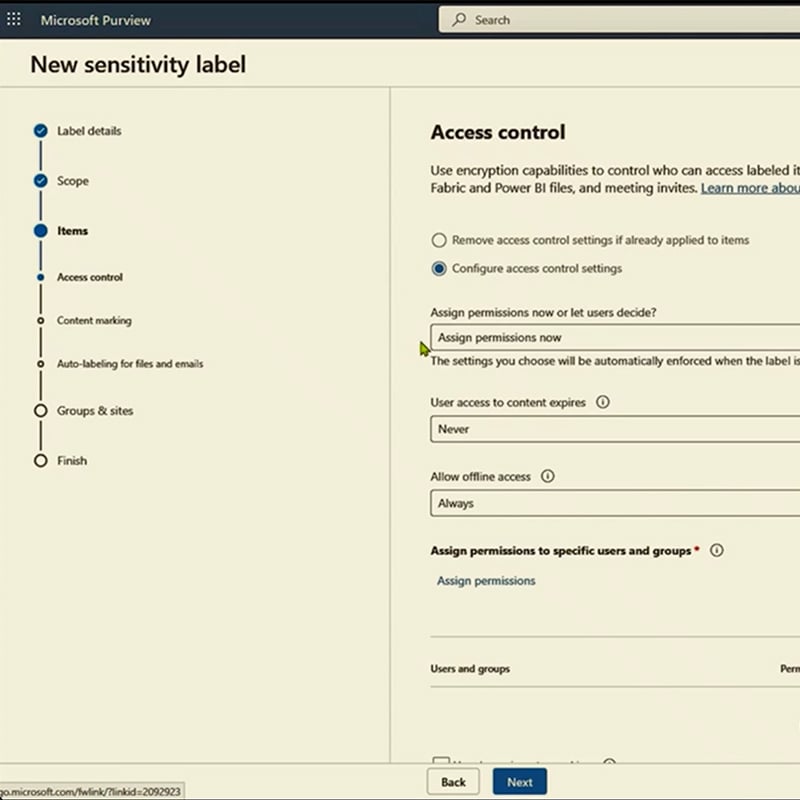
A screenshot of Microsoft Purview Information Protection shows how sensitivity labels help the organization classify, protect, and maintain better control over sensitive data.

Simplify endpoint and access management across the organization

With EMS, IT teams can manage users, devices, applications, and access policies from a centralized platform. This reduces operational complexity, eliminates tool sprawl, and enables faster response to security events—freeing up IT resources for more strategic initiatives.


An employee benefits from her organization’s deployment of Microsoft Enterprise Mobility + Security through Microsoft Entra ID Governance and Entra ID Protection, which help strengthen access controls and reduce identity risk. An employee meeting with her colleague benefits from her organization’s use of Microsoft Enterprise Mobility + Security through Defender for Cloud Apps, which helps improve visibility and control across cloud applications. An employee taking a meeting benefits from the secure work environment created by Microsoft Enterprise Mobility + Security, which helps protect access, devices, and business data behind the scenes.

Protect sensitive data across the modern workplace

EMS ensures that data remains protected regardless of where it resides—whether in email, cloud apps, endpoints, or shared externally. With built-in classification, labeling, and protection capabilities, organizations can reduce the risk of data leakage while maintaining collaboration and productivity.

Dive deeper into Microsoft Enterprise Mobility + Security

Microsoft EMS brings together identity, endpoint, data, and cloud app security to help organizations protect access, manage risk, and stay in control.

Our consulting services related to Microsoft Enterprise Mobility + Security

We offer assessments, engagements, design and configuration, and more. Each resulting in a roadmap to success for your digital transformation.

How we're different

Recognitions and certifications

Synergy Technical has been accredited with several partner recognitions.

Microsoft FastTrack Ready Partner

Microsoft FastTrack Ready Partner

FastTrack is a combination of resources, engineering expertise, and best practices that ensures you have the most efficient deployment and adoption possible.

Microsoft Workshops

Microsoft Security Workshop Partner

As a leading Microsoft Security Workshop partner, we help organizations assess their environments and strengthen protection using Microsoft's productivity and security solutions.
Microsoft Cloud Solutions Partner

Microsoft Cloud Solutions Partner

Subject matter experts in Modern Work for Enterprise and SMB, cybersecurity architecture, identity and access management, information protection, and additional specializations.

Our proven experience

Our proven experience

  • Deployed over 20M seats of Office 365, Microsoft 365, and Microsoft EMS
  • Customers in all 50 states
  • Experience in 70+ countries
Synergy Technical textured background image for the Microsoft Enterprise Mobility + Security page.

Steps to get started:

Contact us today and we can help by offering the following:

  • Schedule an interactive demo
  • Conduct a proof of concept
  • Deploy Microsoft Enterprise Mobility + Security and enable identity protection, endpoint management, and data security 
Contact Us

Frequently asked questions (FAQs) for Microsoft Enterprise Mobility + Security

 
  • What is Microsoft Enterprise Mobility + Security?
    • Microsoft Enterprise Mobility + Security, often called Microsoft EMS is a Microsoft suite designed to help organizations secure identities, manage endpoints, and protect sensitive information. It is commonly positioned as part of a broader Microsoft security and productivity strategy.
  • What does Microsoft Enterprise Mobility + Security include?
  • Is Azure Active Directory part of Microsoft EMS?
    • Yes, but the name has changed. Azure Active Directory is now called Microsoft Entra ID, and Microsoft states that only the name changed while the capabilities remain the same.
  • What is the difference between EMS E3 and EMS E5?
    • EMS E3 provides core identity, access, and endpoint management, and information protection capabilities. EMS E5 builds on that foundation with more advanced security capabilities, including risk-based conditional access, privileged identity management, Defender for Cloud Apps, and Defender for Identity.
  • Is Microsoft EMS the same as Microsoft 365?
    • No. Microsoft EMS is a security and mobility suite, while Microsoft 365 is a broader offering that brings together Microsoft 365 apps, Windows, and EMS. Organizations may buy EMS on its own or as part of a larger Microsoft 365 licensing strategy.
  • Who should consider Microsoft Enterprise Mobility + Security?
    • Microsoft EMS is a strong fit for organizations that need to improve identity security, simplify endpoint management, support hybrid work, and protect sensitive data across users, devices, and cloud applications. It is especially relevant for IT and business leaders looking to reduce risk while creating a more manageable and secure workplace.
  • How can an IT consulting partner like Synergy Technical help with Microsoft Enterprise Mobility + Security?
    • Synergy Technical can help your organization assess its current environment, identify security and mobility gaps, review licensing, and determine how Microsoft EMS fits into your broader business and IT strategy. This is especially helpful for organizations looking to align identity, endpoint management, and data protection efforts across a modern work environment.
  • Why work with Synergy Technical for Microsoft EMS deployment?
    • Microsoft Enterprise Mobility + Security includes multiple technologies across identity, endpoint management, and information protection. A consultant can help your organization prioritize the right capabilities, avoid common deployment challenges, and build a clear roadmap based on your security requirements, existing Microsoft investments, and business goals.
  • Do we need consulting services to implement Microsoft Enterprise Mobility + Security?
    • Not every organization requires consulting support, but many benefit from it when planning or expanding their use of Microsoft EMS. Synergy Technical can help reduce complexity, validate licensing decisions, governance, align stakeholders, and create a more practical approach to deployment, governance, and long-term adoption.