

Centralize desktop delivery, strengthen access control, and support flexible work with Azure Virtual Desktop

While updating spreadsheets and analyzing data in Excel, a female employee stays productive with Azure Virtual Desktop because her apps and work environment remain available in a consistent desktop experience.


What is Azure Virtual Desktop and why it matters


Azure Virtual Desktop is Microsoft's cloud-based desktop and application virtualization service. It allows your organization to deliver full Windows desktops or individual applications to users from Azure, giving employees secure access to the tools they need from virtually anywhere.

AVD provides a more flexible way to manage desktops, applications, user profiles, and access policies while supporting productivity, workforce flexibility, cost control, and stronger protection for company data.

What business challenges does Azure Virtual Desktop solve?


As employees, contractors, and distributed teams need access to business tools from different locations and devices, IT needs a way to deliver that access without creating unnecessary risk, cost, or management burden. With AVD, your organization can centralize desktops and applications in Azure, strengthen identity-based access controls, support legacy and line-of-business apps, scale resources based on demand, and provide users with a more consistent work experience from virtually anywhere.

As she builds charts, reviews data, and collaborates with coworkers, Azure Virtual Desktop helps her stay productive by providing reliable access to the applications and resources she needs from one centralized workspace.


What can you do with Azure Virtual Desktop?

Secure cloud desktops

Deliver a full Windows desktop experience from Azure, giving employees secure access to the apps, files, and settings they need without relying solely on a physical device.

Role-based app access

Provide users with access to specific business applications through RemoteApp, helping IT support legacy apps, specialized software, contractors, and role-based work needs.

Multi-session efficiency

Use Windows multi-session to support multiple users on the same session host, helping your organization improve resource utilization and reduce infrastructure overhead.

Flexible desktop options

Choose pooled desktops for shared workforce needs or personal desktops for users who require dedicated resources, performance, and a more customized experience.

Simplified app management

Use App Attach to deliver applications to virtual sessions without embedding every app into a desktop image, making updates, assignments, and app changes easier to manage.

Consistent user profiles

Support a smoother employee experience with FSLogix profile containers, which help preserve user settings, personalization, and profile data across virtual desktop sessions.

Cost-conscious scaling

Use autoscale to adjust session host capacity based on demand or schedule, helping reduce unnecessary Azure compute costs during lower-usage periods.

Identity-based protection

Connect Azure Virtual Desktop with Microsoft Entra ID, Conditional Access, and multifactor authentication to help verify users and protect access to virtual desktops and applications.

Data protection controls

Use capabilities like screen capture protection and watermarking to help reduce the risk of sensitive information being copied, captured, or exposed during virtual sessions.

Hybrid deployment flexibility

Extend Azure Virtual Desktop to Azure Local when your organization needs to support latency-sensitive workloads on-premises applications, or specific data location requirements.

Ready to learn more? Discover how to deploy Azure Virtual Desktop


Ready to modernize how your organization delivers desktops and applications? Our Azure Virtual Desktop consultants can help you assess your current environment, identify the right users and workloads for AVD, review licensing and Azure cost considerations, and create a deployment approach that supports secure access, flexible work, and long-term manageability.

Schedule an Azure Virtual Desktop consulting session today to explore how your organization can simplify desktop delivery, strengthen remote access, and build a more scalable virtual desktop strategy.

Contact Us

How can Azure Virtual Desktop help your organization?

Synergy Technical textured background image for the Azure Virtual Desktop page.
A male employee stays productive whether he is in the office, at home, or traveling because Azure Virtual Desktop gives him secure access to organization applications and a familiar Windows experience from virtually anywhere. An employee moves between locations and devices throughout the day while Azure Virtual Desktop keeps work accessible through a secure cloud desktop that delivers a consistent experience wherever work happens.

Support secure work from virtually anywhere

Azure Virtual Desktop helps your organization give users access to the desktops and applications they need without forcing IT to rely entirely on local endpoint configuration. Employees can work from different locations and devices while IT maintains stronger control over identity, access, applications, and session policies.

For organizations supporting hybrid teams, distributed offices, contractors, or field employees, this creates a more flexible way to deliver work resources while reducing the risk of unmanaged access.
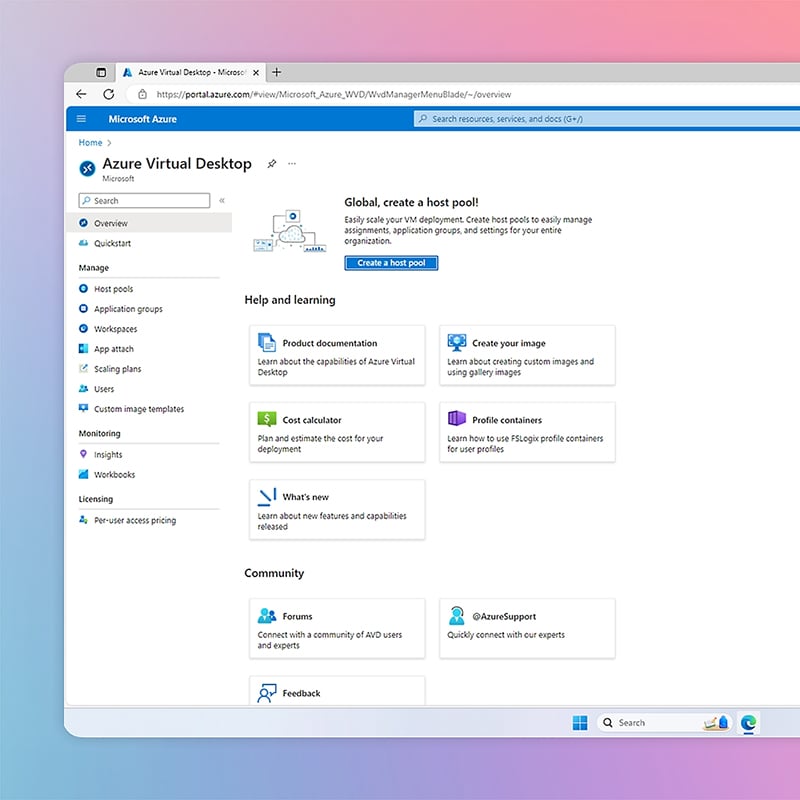
A screenshot of Azure Virtual Desktop shows how the platform helps organizations centralize desktop and application delivery so users can securely access work resources from a single cloud-based environment.

Simplify desktop and application management

Managing physical desktops, application installations, updates, and user profiles across a large workforce can become time-consuming and difficult to scale. AVD centralizes desktop and app delivery in Azure, helping IT teams manage host pools, application groups, workspaces, images, user profiles, and access policies from a more unified environment.

Capabilities like App Attach, FSLogix, pooled desktops, and RemoteApp can help reduce manual deployment work and make it easier to provide the right applications to the right users.


With an Azure-based approach to desktop and application management, Azure Virtual Desktop helps organizations simplify access, strengthen control, and give employees a more efficient way to work across distributed environments. A female employee uses Azure Virtual Desktop on her laptop to securely open her work desktop, access line-of-business applications, and continue working without interruption from wherever she signs in. A male employee works smoothly from his laptop using Azure Virtual Desktop, which helps him access the tools he needs while the organization keeps desktops, policies, and access controls more centralized.

Improve cost control and scalability

Azure Virtual Desktop can help organizations shift from rigid desktop infrastructure models to a more flexible Azure-based approach. With pooled resources, Windows multi-session, autoscale, and usage-based Azure infrastructure, organizations can align desktop capacity with actual demand instead of overbuilding for every scenario.

This can be valuable for seasonal workforces, contractors, call centers, training environments, mergers and acquisition scenarios, and organizations modernizing from legacy VDI.

Dive deeper into other solutions

We can implement Microsoft's full suite of productivity, security, and compliance solutions—including Azure, Entra, Defender, Intune, Microsoft 365, Priva, Purview, Teams, Windows, and more—to help your organization stay secure, connected, and ready for what's next.
How we're different

Recognitions and certifications

Synergy Technical has been accredited with several partner recognitions.
Microsoft FastTrack Ready Partner

Microsoft FastTrack Ready Partner

FastTrack is a combination of resources, engineering expertise, and best practices that ensures you have the most efficient deployment and adoption possible.

Microsoft Workshops

Microsoft Security Workshop Partner

As a leading Microsoft Security Workshop partner, we help organizations assess their environments and strengthen protection using Microsoft's productivity and security solutions.
Microsoft Cloud Solutions Partner

Microsoft Cloud Solutions Partner

Subject matter experts in Modern Work for Enterprise and SMB, cybersecurity architecture, identity and access management, information protection, and additional specializations.

Our proven experience

Our proven experience

  • Deployed over 20M seats of Office 365, Microsoft 365, and Microsoft EMS
  • Customers in all 50 states
  • Experience in 70+ countries
Synergy Technical textured background image for the Azure Virtual Desktop page.

Ready to get started?

Contact us today and we can help by offering the following:

  • Schedule an interactive demo
  • Conduct a proof of concept
  • Deploy Azure Virtual Desktop and securely deliver cloud desktops and apps while simplifying management, access, and workforce flexibility
Contact Us

Frequently asked questions (FAQs) for Azure Virtual Desktop

 
  • What is Azure Virtual Desktop?
    • Azure Virtual Desktop is Microsoft's cloud-based desktop and application virtualization service. It allows your organization to deliver full Windows desktops or individual business applications from Azure, giving users secure access to the tools they need from different locations and devices.

  • How does Azure Virtual Desktop help support hybrid work?
    • Azure Virtual Desktop helps employees access their work desktops and applications from virtually anywhere while giving IT more control over identity, access policies, sessions, and data protection. This makes it easier to support remote employees, hybrid teams, contractors, and distributed offices.

  • What business challenges does Azure Virtual Desktop solve?
    • AVD can help organizations reduce endpoint complexity, modernize traditional VDI, improve application access, support secure remote work, and control virtual desktop costs. It is especially useful for organizations that need to deliver business applications across multiple devices, locations, or user groups.

  • Can AVD help reduce IT management complexity?
    • Yes. Azure Virtual Desktop centralizes desktop and application delivery in Azure, helping IT teams manage host pools, application access, user profiles, images, and policies from a cloud-based environment. This can reduce the need to configure and maintain every endpoint the same way.

  • Is Azure Virtual Desktop secure?
  • What types of organizations should consider Azure Virtual Desktop?
    • Azure Virtual Desktop is a strong fit for organizations supporting hybrid work, contractor access, seasonal teams, call centers, training environments, legacy applications, mergers and acquisitions, or business continuity planning. It can also benefit organizations looking to reduce reliance on traditional on-premises VDI infrastructure.

  • Can Azure Virtual Desktop deliver only specific applications?
    • Yes. AVD can publish individual applications through RemoteApp, allowing users to access specific business tools without launching a full virtual desktop. This is helpful for legacy applications, role-based access, contractor use cases, and specialized software.

  • How does Azure Virtual Desktop help control costs?
    • Azure Virtual Desktop supports pooled desktops, Windows multi-session, and autoscale, helping organizations align virtual desktop resources with actual demand. This can reduce unnecessary Azure compute usage when users are offline or when demand is lower.

  • What is the difference between pooled and personal desktops?
    • Pooled desktops allow multiple users to share session host resources, which can be useful for task workers, shift-based teams, or general workforce scenarios. Personal desktops assign dedicated resources to specific users who need more customization, performance, or separation.

  • How can Azure Virtual Desktop consulting help our organization?
    • Synergy Technical's AVD consulting can help your organization evaluate current desktop and application needs, identify the right workloads for AVD, review licensing and cost considerations, design the right architecture, and create a deployment plan that supports security, performance, and long-term management. Contact us to learn more.