

Enable secure, scalable endpoint management with Microsoft Configuration Manager

As he builds his presentation, the employee seamlessly accesses the tools and files he needs—kept secure and consistently updated by Microsoft Configuration Manager.


What is Microsoft Configuration Manager and why it matters


Microsoft Configuration Manager (formerly System Center Configuration Manager or SCCM) is a powerful on-premises endpoint management solution designed to simplify and centralize the way organizations manage their infrastructure. As part of the Microsoft Intune family of products, it provides the robust control and visibility enterprises need to manage devices, deploy software, enforce security, and ensure compliance across hybrid work environments.

Whether your organization needs to maintain legacy systems, manage devices not yet ready for cloud, or extend endpoint management to support hybrid workforces, Configuration Manager delivers the flexibility and reliability IT leaders demand.

What can you do with Microsoft Configuration Manager?

Microsoft Configuration Manager is packed with powerful capabilities designed to give IT teams full control over their endpoint environment. From deploying critical updates to supporting remote users, each feature is built to streamline operations, strengthen security, and enhance the employee experience. Here's how Configuration Manager delivers value across the modern workplace:

Software and update deployment

Seamlessly distribute applications, software updates, and operating systems across your entire organization to ensure consistency and reduce vulerabilities.

Endpoint protection and compliance

Enforce security policies, manage antivirus settings, apply patch management, and monitor compliance status to stay ahead of threats and regulatory requirements.

Configuration and asset management

Gain deep visibility into your IT environment with real-time hardware and software inventory, configuration baselines, and dynamic collections.

Remote management and support

Provide remote control and assistance for users, even across distributed locations, reducing downtime and improving support responsiveness.

Self-service software center

Empower employees to install approved apps and updates on demand, reducing IT overhead while improving user satisfaction.

Cloud attach and co-management with Intune

Extend your reach by integrating with Microsoft Intune to manage internet-connected or remote devices and prepare for modern, cloud-based management—at your own pace.

Ready to learn more? Discover how to deploy and configure Microsoft Configuration Manager


Whether you're managing a hybrid workforce, securing sensitive data, or modernizing your IT infrastructure, Microsoft Configuration Manager gives you the control, visibility, and flexibility to succeed. Join the thousands of organizations already using Configuration Manager to streamline operations and stay ahead of today's challenges. Ready to get started?

Talk to a Microsoft expert or explore deployment options to see how Configuration Manager can fit your environment.

Contact Us

How can Microsoft Configuration Manager help your organization?

Synergy Technical textured background image for the Microsoft Configuration Manager page.
The IT professional uses Microsoft Configuration Manager to proactively secure endpoints and enforce compliance across the organization with confidence. From a single console, she ensures every endpoint is protected, patched, and aligned with corporate and regulatory requirements—thanks to Microsoft Configuration Manager.

Boost security and compliance

Ensure that every endpoint is up to date, protected, and compliant with corporate and regulatory policies. Configuration Manager helps automate patching, enforce configurations, and provide audit-ready reporting.
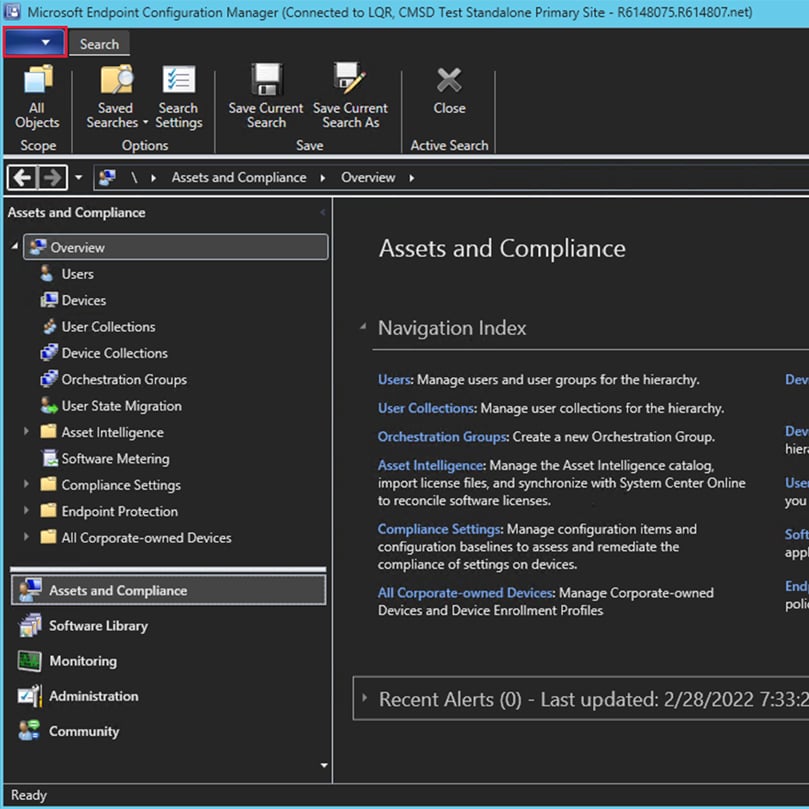
The Microsoft Configuration Manager console provides IT with centralized visibility and control over every device, update, and security policy.

Enable productive hybrid work

Support distributed teams by delivering applications and updates over the cloud, even to devices that rarely connect to the corporate network. Remote control and self-service capabilities empower employees without compromising IT control.


Working from the office, she stays productive on a secure, fully managed device—one of thousands centrally maintained through Microsoft Configuration Manager. With her apps and settings deployed automatically by Microsoft Configuration Manager, she shows her manager how IT efficiency supports her day-to-day work. Microsoft Configuration Manager brings together software deployment, security enforcement, and compliance tracking—centralizing management across all endpoints.

Simplify management and improve efficiency

Centralize the management of thousands of endpoints from a single console. Automate routine tasks, standardize device provisioning, and integrate with Microsoft services to reduce manual effort and free up your IT team for strategic initiatives.

Dive deeper into the Intune family

Securely manage devices, enforce compliance policies, and protect corporate data across endpoints.

How we're different

Recognitions and certifications

Synergy Technical has been accredited with several partner recognitions.

Microsoft FastTrack Ready Partner

Microsoft FastTrack Ready Partner

FastTrack is a combination of resources, engineering expertise, and best practices that ensures you have the most efficient deployment and adoption possible.
Microsoft Workshops

Microsoft Security Workshop Partner

As a leading Microsoft Security Workshop partner, we help organizations assess their environments and strengthen protection using Microsoft's productivity and security solutions.
Microsoft Cloud Solutions Partner

Microsoft Cloud Solutions Partner

Subject matter experts in Modern Work for Enterprise and SMB, cybersecurity architecture, identity and access management, information protection, and additional specializations.

Our proven experience

Our proven experience

  • Deployed over 20M seats of Office 365, Microsoft 365, and Microsoft EMS
  • Customers in all 50 states
  • Experience in 70+ countries
Synergy Technical textured background image for the Microsoft Configuration Manager page.

Ready to get started?

Contact us today and we can help by offering the following:

  • Schedule a free interactive demo
  • Conduct a proof of concept
  • Deploy and configure Microsoft Configuration Manager to provide your IT team with secure, scalable, and centralized endpoint management
Contact Us