

Give employees a consistent Windows experience from virtually anywhere with Windows 365 Cloud PCs

A female executive presents her PowerPoint deck in the meeting room while using Windows 365, which helps keep her desktop experience consistent and available across devices when she needs to stay ready for important meetings.


What is Windows 365 and why it matters


Windows 365 is Microsoft's Cloud PC solution that streams a full Windows desktop experience from the cloud to supported devices. It gives users access to their desktop, apps, settings, and data from virtually anywhere while helping organizations simplify how Windows environments are delivered and managed. Windows 365 is designed to support a range of needs, from straightforward cloud desktop adoption to more advanced management, policy, and workforce scenarios.

What business challenges does Windows 365 solve?


Windows 365 helps solve common challenges around desktop provisioning, remote work support, device dependency, and desktop management complexity. It provides a more flexible way to deliver Windows desktops to employees, contractors, and shift-based workers without relying entirely on traditional infrastructure or one physical device per user. It also helps create a more consistent user experience while supporting a more centralized and cloud-based approach to management.

A female employee builds charts and graphs on her laptop using Windows 365, allowing her to work within a familiar Cloud PC environment that keeps her settings, files, and applications available from virtually anywhere.


What can you do with Windows 365?

Windows 365 includes cloud-based capabilities that make it easier to deliver, manage, and scale Windows desktops across your organization.

Consistent Cloud PC experience

Give each user a personal Cloud PC with their own desktop, app, settings, and files available across sessions and devices.

Access from virtually anywhere

Enable employees to securely connect to their Cloud PC from supported devices through a browser or app-based experience.

Resizable performance

Adjust Cloud PC size as workload needs change so users have the resources required for their day-to-day work.

Built-in restore capabilities

Recover Cloud PCs to an earlier point in time to help reduce downtime and support business continuity.

Microsoft Intune integration

Manage Cloud PCs alongside other endpoints in Microsoft Intune for a more unified management experience.

Support for shift and shared workforces

Provide Cloud PC access for employees who do not need a dedicated desktop at all times.

Ready to learn more? Discover how to deploy Windows 365


Ready to explore Windows 365 for your organization? Our consultants can help you assess your environment, identify the right use cases, review deployment options, and determine how Windows 365 can support your employees and long-term business goals.

Contact Us

How can Windows 365 help your organization?

Synergy Technical textured background image for the Windows 365 page.
A male IT manager uses Windows 365 to simplify desktop delivery and management by provisioning Cloud PCs through a cloud-based model that is easier to deploy and oversee. An IT team uses Windows 365 as a standardized cloud-based approach to deliver Windows desktops, helping reduce the infrastructure complexity that often comes with older desktop virtualization models.

Simplify desktop delivery and management

Windows 365 helps organizations reduce the operational burden that comes with traditional desktop provisioning and virtual desktop environments. For many organizations, that means giving IT a more standardized and cloud-based way to deliver Windows desktops without having to build and maintain the same level of infrastructure complexity that older models often require.
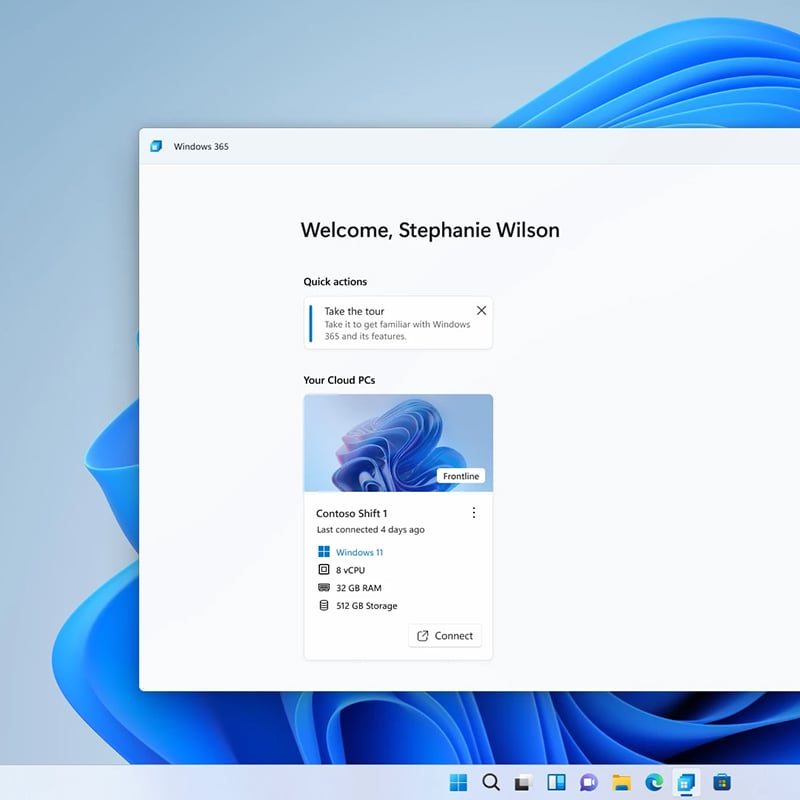
A screenshot of Windows 365 shows how organizations can provide users with a dedicated Cloud PC experience that supports secure access to desktops, apps, and data from supported devices.

Support a more secure and flexible workforce

Because Windows 365 keeps the Windows experience in the cloud, it can help organizations support remote employees, contractors, and bring-your-own-device users with more control. This matters to business and IT leaders who need to balance workforce flexibility with security, compliance, and consistent access to company resources.


IT provisions Cloud PCs for new users more quickly with Windows 365 and resizes them when performance needs change, giving the organization more flexibility as workforce and workload demands shift. An employee uses Windows 365 to work on her laptop, making it easier to stay productive with access to her Cloud PC whether she is in the office, at home, or on the go. An employee uses Windows 365 to work on his laptop, helping him stay connected to his desktop, business applications, and files without being limited to one physical device.

Improve agility as workforce needs change

Windows 365 gives organizations more room to adapt when staffing, device needs, and business priorities shift. IT can provision Cloud PCs for new users more quickly and resize them when performance needs change for worker models that do not fit a one-device-per-user approach. That agility can be especially valuable during hiring surges, contractor onboarding, seasonal operations, mergers, and distributed work initiatives.

Dive deeper into other solutions

We can implement Microsoft's full suite of productivity, security, and compliance solutions—including Azure, Entra, Defender, Intune, Microsoft 365, Priva, Purview, Teams, Windows, and more—to help your organization stay secure, connected, and ready for what's next.


How we're different

Recognitions and certifications

Synergy Technical has been accredited with several partner recognitions.

Microsoft FastTrack Ready Partner

Microsoft FastTrack Ready Partner

FastTrack is a combination of resources, engineering expertise, and best practices that ensures you have the most efficient deployment and adoption possible.

Microsoft Workshops

Microsoft Security Workshop Partner

As a leading Microsoft Security Workshop partner, we help organizations assess their environments and strengthen protection using Microsoft's productivity and security solutions.
Microsoft Cloud Solutions Partner

Microsoft Cloud Solutions Partner

Subject matter experts in Modern Work for Enterprise and SMB, cybersecurity architecture, identity and access management, information protection, and additional specializations.

Our proven experience

Our proven experience

  • Deployed over 20M seats of Office 365, Microsoft 365, and Microsoft EMS
  • Customers in all 50 states
  • Experience in 70+ countries
Synergy Technical textured background image for the Windows 365 page.

Steps to get started:

Contact us today and we can help by offering the following:

  • Schedule an interactive demo
  • Conduct a proof of concept
  • Deploy Windows 365 and support your workforce with Windows desktops that are easier to deliver, manage, and access
Contact Us

Frequently asked questions (FAQs) for Windows 365

 
  • What is Windows 365?
    • Windows 365 is Microsoft's Cloud PC solution that delivers a full Windows desktop experience from the cloud. It lets users access their desktop, apps, settings, and files from supported devices, including Windows, Mac, iOS, and Android.

  • How is Windows 365 different from traditional virtual desktop infrastructure?
    • Windows 365 is delivered as a software-as-a-service solution, which means Microsoft handles much of the underlying infrastructure complexity. This gives organizations a simpler way to provide cloud-based Windows desktops without taking on the same level of setup and management that often comes with traditional VDI environments.

  • What is a Cloud PC?
    • A Cloud PC is a virtual Windows machine hosted in the Windows 365 service. In most Windows 365 editions, each licensed user gets their own personal Cloud PC with a persistent desktop experience they can return to across sessions.

  • What business challenges can Windows 365 help solve?
    • Windows 365 can help address challenges related to remote and hybrid work, desktop provisioning, device dependency, and the complexity of delivering secure desktop access across distributed teams. It also gives organizations a more flexible way to support contractors, temporary staff, and other users who may not fit a traditional one-device-per-user model.

  • Can users access Windows 365 from different devices?
    • Yes. Users can access their Cloud PC through the Windows 365 service using supported browsers, Microsoft Remote Desktop, or the Windows app, depending on the platform. Windows 365 can be accessed across Windows, Mac, iOS, and Android devices.

  • How can Synergy Technical's consulting services help with a Windows 365 initiative?
    • Our consulting services can help your organization evaluate where Windows 365 fits, identify the right use cases, review licensing and deployment options, and build a practical plan for adoption.

  • Can you help us determine whether Windows 365 is the right fit for our organization?
    • Yes. A Windows 365 consulting engagement can help assess your current environment, workforce needs, desktop management challenges, and long-term goals to determine whether Windows 365 aligns with your organization.

  • Do you offer help with Windows 365 planning and deployment?
    • Yes. Our consulting services can support planning, solution design, readiness reviews, and deployment guidance so your organization has a clearer path for adopting Windows 365.

  • Can you help us align Windows 365 with Microsoft Intune and our existing environment?
    • Yes. A consulting engagement can help your organization understand how Windows 365 fits with Microsoft Intune, existing endpoint strategies, user access needs, and boarder cloud initiatives.

  • Can you help us build a roadmap for Windows 365 adoption?
    • Yes. Synergy Technical can help define priorities, identify phases, outline requirements, and create a roadmap that supports a more structured Windows 365 rollout.

  • Do you provide licensing guidance for Windows 365?
    • Yes. Synergy Technical can help your organization review Windows 365 licensing options and understand which approach best fits your workforce and operational needs.