

Reduce data risk, simplify security operations, and accelerate threat response with Microsoft Defender

A male CIO leading the conversation on security transformation—showcasing how Defender’s unified platform can reduce tool sprawl, streamline operations, and unlock cost savings while future-proofing the business against evolving threats.


What is Microsoft Defender and why it matters


Microsoft Defender is a comprehensive suite of security solutions that helps protect your entire digital estateacross endpoints, identities, email, cloud apps, and infrastructure. Seamlessly integrated with Microsoft 365 and Azure, it empowers organizations to reduce risk, detect threats faster, and simplify security operations.

Microsoft Defender helps solve critical challenges:

  • Rising cyberattacks that bypass traditional defenses
  • Gaps created by remote work and bring-your-own-device (BYOB) policies
  • Compliance with evolving regulations and industry standards
  • Limited security staff and stretched IT budgets

What can you do with Microsoft Defender?

Microsoft Defender includes a powerful set of integrated tools designed to secure every layer of your organization:

Gain multi-cloud and hybrid infrastructure protection with Microsoft Defender for Cloud

Strengthen your cloud infrastructure—multi-cloud and hybrid workloads—with posture management, threat protection, and compliance tools.

Protect your cloud services and apps with Microsoft Defender for Cloud Apps

Microsoft Defender for Cloud Apps is a comprehensive cross-SaaS solution that brings deep visibility, strong data controls, and enhanced threat protection to your cloud apps.

Protect your endpoints and respond to advanced threats with Defender for Endpoint

Microsoft Defender for Endpoint is an endpoint security solution that helps to secure against ransomware, file-less malware, and other attacks on Windows, macOS, Linux, Android, and iOS.

Expose and stop identity-based attacks with Microsoft Defender for Identity

Microsoft Defender for Identity uses Active Directory signals to identify, detect, and investigate advanced threats, compromised identities, and malicious insider actions against your organization.

Keep malware out of your email with Microsoft Defender for Office 365

Microsoft Defender for Office 365 can help safeguard your organization against malicious threats posed by email messages, links like URLs, and collaboration tools and more.

Extend detection and response across the entire enterprise with Microsoft Defender XDR

Correlate threat data across endpoints, email, identity, and cloud with a unified pre- and post-breach defense suite that combines multiple individual Defender solutions.

Do you want to find out more?

Need expert guidance on Microsoft Defender? Schedule a consulting session with a Microsoft-certified advisor to explore the platform's capabilities, address your organization's security challenges, and get clarity on licensing, integration, and deployment. This tailored session helps you evaluate fit, reduce risk, and plan your next steps with confidence.

Contact Us

How can Microsoft Defender help your organization?

Synergy Technical textured background image for the Microsoft Defender page.
A female IT director witnessing the power of Defender’s AI and threat intelligence in action—detecting threats before they reach users and automating response across devices, apps, and identities. With Defender running silently in the background, a female IT director can focus on strategic initiatives—knowing the platform is actively protecting users, data, and systems across her organization.

Stop advanced threats before they cause harm

Microsoft Defender uses cloud-powered AI, behavior-based detection, and threat intelligence from over 84 trillion signals daily to identify and stop attacks before they escalate. From zero-day malware to sophisticated phishing campaigns, Defender helps detect threats in real time and automatically mitigates them across devices, identities, email, and cloud workloads—often before users are even aware. This proactive protection helps reduce business downtime and costly security incidents.
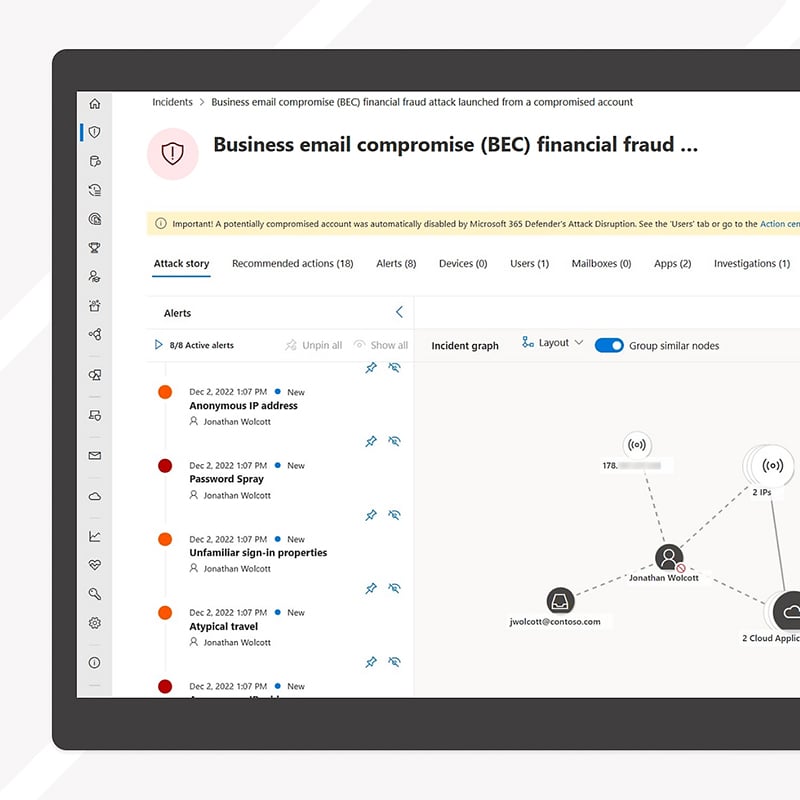
A screenshot highlights Microsoft Defender’s automation power—alert correlation, guided incident response, and self-healing endpoints work together to accelerate resolution times and reduce security team fatigue.

Simplify and streamline security operations

Defender consolidates multiple security tools into one unified platform, enabling security and IT teams to manage threats from a single interface. Automatic alert correlation, incident response workflows, and self-healing capabilities save time and reduce manual effort. By reducing tool sprawl and integrating tightly with Microsoft 365, Defender improves efficiency while lowering total cost of ownership, making enterprise-grade security accessible to lean teams.


Unseen but always working, Microsoft Defender ensures these employees can collaborate, share, and create with confidence—free from security distractions or interruptions. Defender blends seamlessly into their day—blocking phishing emails, securing devices, and preventing data loss without disrupting workflows or user experience. Protected by Microsoft Defender, the team can innovate and work freely—whether they’re in the office or remote. Security is no longer a barrier, but a quiet enabler of their productivity.

Secure the modern workplace, anywhere

With built-in support for remote work, BYOD, and hybrid cloud environments, Microsoft Defender ensures consistent protection no matter where users work or what devices they use. Defender continuously monitors endpoints, enforces conditional access based on device health, and protects corporate data across unmanaged devices and third-party SaaS apps. It empowers organizations to adopt flexible work models without compromising on security or compliance.

Learn more about who we are

Dive deeper into the Microsoft Defender family

Microsoft Defender is a comprehensive suite of security solutions that helps protect your entire digital estate across endpoints, identities, email, cloud apps, and infrastructure.

How we're different

Recognitions and certifications

Synergy Technical has been accredited with several partner recognitions.

Microsoft FastTrack Ready Partner

Microsoft FastTrack Ready Partner

FastTrack is a combination of resources, engineering expertise, and best practices that ensures you have the most efficient deployment and adoption possible.

Microsoft Workshops

Microsoft Security Workshop Partner

As a leading Microsoft Security Workshop partner, we help organizations assess their environments and strengthen protection using Microsoft's productivity and security solutions.

Microsoft Cloud Solutions Partner

Microsoft Cloud Solutions Partner

Subject matter experts in Modern Work for Enterprise and SMB, cybersecurity architecture, identity and access management, information protection, and additional specializations.

Our proven experience

Our proven experience

  • Deployed over 20M seats of Office 365, Microsoft 365, and Microsoft EMS
  • Customers in all 50 states
  • Experience in 70+ countries
Synergy Technical textured background image for the Microsoft Defender page.

Ready to get started?

Synergy Technical has a long history of delivering successful cloud and on-premises security solutions to customers. Contact us to learn best practices on how to successfully deploy Microsoft Defender while meeting your organization's security requirements.

Contact Us

Frequently asked questions (FAQs) for Microsoft Defender

 
  • What is Microsoft Defender?
    • Microsoft Defender is a unified suite of security solutions designed to protect identities, endpoints, email, cloud apps, and data across your organization. It provides advanced threat protection through AI-driven detection, automation, and Microsoft's global threat intelligence network.
  • How does Microsoft Defender fit within Microsoft's security ecosystem?
  • What products are included in the Microsoft Defender family?
  • How does Microsoft Defender detect and stop cyber threats?
    • Defender combines behavioral analytics, machine learning, and Microsoft's real-time threat intelligence to identify suspicious activity across devices, users, and applications. Automated investigation and remediation can isolate or remove threats without manual intervention.
  • Can Microsoft Defender protect hybrid and multi-cloud environments?
    • Yes. Microsoft Defender for Cloud extends protection beyond Azure to AWS, Google Cloud, and hybrid environments. It helps identify misconfigurations, assess compliance, and detect threats across all your cloud workloads.
  • How does Microsoft Defender support Zero Trust security?
    • Microsoft Defender helps organizations implement Zero Trust by continuously verifying identities, enforcing least-privilege access, and monitoring endpoints for compromise. It integrates with Microsoft Entra to ensure that only healthy, verified devices access company data.
  • Is Microsoft Defender managed from a single dashboard?
    • Yes. Microsoft Defender provides a centralized console where IT teams can monitor alerts, review incidents, configure policies, and respond to threats across endpoints, email, and identities—all in one view.
  • How does AI enhance Microsoft Defender's protection capabilities?
    • AI is core to Microsoft Defender. It analyzes trillions of daily signals across Microsoft's ecosystem to recognize emerging attack patterns, predict potential threats, and accelerate response times—empowering IT teams to act faster and more precisely.
  • How does Microsoft Defender help with compliance and data protection?
    • Defender can integrate with Microsoft Purview to protect sensitive data, detect data exfiltration attempts, and generate compliance insights. This helps organizations meet privacy and regulatory requirements more easily.
  • Why should an organization work with a Microsoft consulting partner for Defender deployment?
    • Partnering with a certified Microsoft consulting parter like Synergy Technical can help you assess your security posture, deploy the right Defender solutions for your environment, and integrate them with existing systems. Expert guidance ensures maximum protection, faster adoption, and a smoother transition to a unified security strategy.