
Generally Available • Updated for the June 16, 2026 release
Microsoft 365 Copilot Cowork is now generally available, introducing a new way for organizations to use AI inside Microsoft 365.
Rather than responding to individual prompts, Copilot Cowork can coordinate work across applications, people, and business processes. It plans multi-step activities, completes work in the background, requests approval when needed, and helps employees move work forward with less manual coordination.
That shift reflects a broader evolution in enterprise AI. Organizations are moving beyond asking how AI can improve individual productivity and beginning to explore how it can support entire business workflows.
This guide explains what Microsoft Copilot Cowork is, how it works, how it fits within the Microsoft 365 Copilot ecosystem, and what organizations should consider before deploying it. We'll cover architecture, licensing, governance, security, Skills, practical use cases, and the steps organizations can take to prepare for the next generation of agentic AI.
Table of Contents (click a topic below to go directly to that section)
- How Copilot Cowork is Built: Microsoft 365, Work IQ, and Multi-Model AI
- Copilot Cowork vs. Copilot Chat and the Microsoft Copilot Family
- How Copilot Cowork Works: The Plan-Act-Approve Loop
- What Can Copilot Cowork Do?
- Copilot Cowork Use Cases by Role
- Who Gets Copilot Cowork? Availability, Licensing and Devices
- Copilot Cowork Pricing: Understanding Copilot Credits
- Setting Up Copilot Cowork: Admin Setup and Governance
- Staying in Control: Trust, Approvals and Security
- Copilot Cowork Skills, Custom Skills and Plugins
- Copilot Cowork Limitations and Workarounds
- Is Microsoft Copilot Cowork Worth It?
- Preparing for the Agentic Era: What to Do Now
- Conclusion: The Next Step in Enterprise AI
- Frequently Asked Questions (FAQs) for Microsoft 365 Copilot Cowork
What is Microsoft Copilot Cowork?
As organizations move beyond conversational AI, the focus is shifting from generating information to coordinating work. Microsoft 365 Copilot Cowork is an agentic AI capability within Microsoft 365 that helps employees complete work spanning multiple applications, multiple steps, and multiple points in time.
Traditional AI assistants wait for instructions, complete a task, and then wait for the next prompt. Copilot Cowork is designed to carry work forward. It can organize a sequence of actions, gather information from Microsoft 365, pause when human approval is required, and continue once that approval has been given.
Microsoft introduced Copilot Cowork because enterprise AI is evolving beyond helping employees create content more efficiently. Drafting a document or summarizing a meeting is often only one step in a much larger process. Someone still needs to schedule meetings, gather approvals, update documents, follow up with stakeholders, and keep projects moving. Copilot Cowork was designed to participate in that broader workflow.
Consider a simple example:
You're unable to attend a customer meeting because another priority requires your attention. Instead of manually reviewing your calendar, drafting a response, finding supporting documents, and briefing a colleague, you ask Microsoft 365 Copilot Cowork to handle the process. Cowork reviews the meeting details, drafts a courteous decline, recommends the colleague best suited to attend, gathers the relevant documents from Microsoft 365, prepares a meeting briefing, and pauses for approval before sending anything. Once approved, it completes the remaining work and confirms that everything is ready.
The value isn't any individual action. Employees could complete each of those tasks themselves. The value comes from reducing the coordination of work that happens between those tasks, allowing projects to continue moving forward with less administrative effort.
This reflects a broader shift in enterprise AI. Early workplace AI focused on helping people generate information more efficiently. Copilot Cowork extends that capability into the coordination layer of everyday work, helping employees manage the activities that connect projects, people, and business systems.
Skills vs. Agents
One concept worth understanding early is the relationship between Skills and agents, because Microsoft uses both terms throughout its Copilot portfolio.
Skills represent individual capabilities. They allow Copilot to perform specific actions, such as scheduling meetings, summarizing documents, retrieving information, or interacting with approved business systems.
Agents combine those capabilities into a broader responsibility. They pursue an objective by determining which Skills to use, maintaining context across multiple steps, and coordinating work until the objective has been completed or human input is required.
A useful way to think about the difference is this:
A Skill is something AI can do. An agent is responsible for accomplishing something.
Copilot Cowork builds on that idea by coordinating multiple Skills around a business objective rather than treating each task as an isolated request. As Microsoft continues expanding agentic AI, that operating model is likely to become increasingly common across Microsoft 365.

How Copilot Cowork is Built: Microsoft 365, Work IQ, and Multi-Model AI
How Copilot Cowork is built is just as important as what it can do.
Microsoft developed Copilot Cowork as part of its broader vision for agentic AI in Microsoft 365, combining advanced language model capabilities with the organizational context employees rely on every day. Rather than requiring organizations to move information into a separate AI environment, Copilot Cowork is designed to work within the Microsoft 365 ecosystem they already use.
That architectural decision matters because enterprise AI depends on much more than the underlying AI model. To be useful in a business setting, AI needs to understand organizational context—documents, meetings, conversations, calendars, permissions, and the relationships between them. Without that context, even the most capable language model has only a limited understanding of how work actually happens inside an organization.
Microsoft addresses that challenge through Work IQ, which provides Copilot Cowork with organizational context drawn from Microsoft 365. Instead of treating every request as an isolated prompt, Work IQ helps AI understand how information is connected across Outlook, Teams, SharePoint, OneDrive, and other Microsoft 365 services while continuing to respect existing permissions and security controls.
For example, preparing an executive briefing might require information from email conversations, Teams meetings, SharePoint documents, presentation files, and calendar events. Rather than asking an employee to locate and organize that information manually, Copilot Cowork can assemble the relevant context as part of a single workflow while maintaining awareness of the broader objective.
For employees, the experience feels more connected because AI understands the environment in which work is taking place instead of relying on isolated conversations.
For IT leaders, the architecture offers another advantage. Copilot Cowork operates within the Microsoft 365 trust boundary, allowing organizations to extend AI using the identity, security, compliance, and governance capabilities they have already established. Existing Microsoft Entra ID permissions continue to determine what information users can access, while services such as Microsoft Purview remain part of the organization's broader governance strategy.
This reflects Microsoft's broader approach to enterprise AI. Rather than introducing AI as a separate destination, Microsoft is embedding agentic capabilities into the productivity platform organizations already depend on. That allows businesses to build on existing investments instead of adopting an entirely new operating model.
For organizations evaluating Copilot Cowork, that integration may be just as important as the AI itself. The long-term value of enterprise AI depends not only on the intelligence of the model, but on its ability to work securely, understand business context, and operate naturally within the flow of everyday work.

Copilot Cowork vs. Copilot Chat and the Microsoft Copilot Family
Microsoft's Copilot portfolio has expanded rapidly over the past two years, creating understandable confusion for many organizations. Many business leaders know they want to adopt AI but aren't always sure which Copilot experience is designed for which type of work.
Looking at the portfolio as a progression makes Microsoft's strategy much easier to understand:
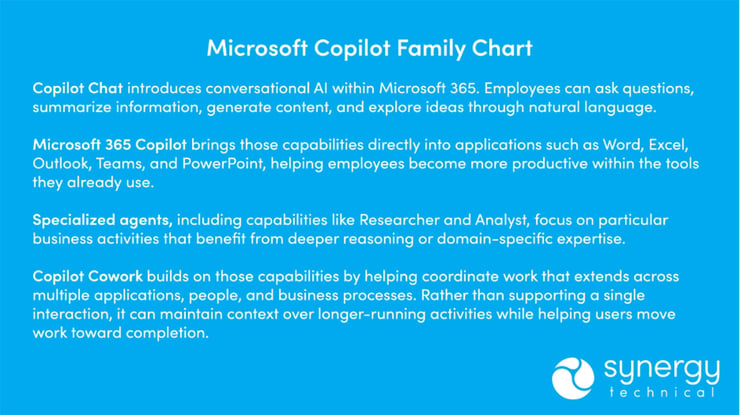
Another way to think about the progression is this:
-
Copilot Chat helps you think.
- Microsoft 365 Copilot helps you work.
- Specialized agents perform focused responsibilities.
- Copilot Cowork helps coordinate work from beginning to end.
These experiences complement one another rather than compete.
A typical employee might use Copilot Chat to brainstorm ideas, Microsoft 365 Copilot in Word to draft a proposal, and Copilot Cowork to coordinate reviews, gather supporting information, schedule meetings, and prepare follow-up activities. Each capability contributes to a different stage of the same workflow.
This progression reflects Microsoft's broader AI strategy. Each step expands the role AI plays within the organization. Early experiences focused on answering questions. Later capabilities helped employees produce work more efficiently. Copilot Cowork extends that evolution by helping coordinate the work that connects people, information, and business processes.
Understanding how these experiences fit together makes it easier to identify where Copilot Cowork belongs within a broader Microsoft 365 AI strategy. In the next section, we'll look at how Copilot Cowork plans, executes, and manages work through Microsoft's Plan–Act–Approve model.

How Copilot Cowork Works: The Plan–Act–Approve Loop
Copilot Cowork is designed around outcomes rather than individual prompts.
Instead of asking AI to complete one task at a time, users describe the result they're trying to achieve. Copilot Cowork interprets that objective, develops a plan, identifies the information it needs, and determines which actions will help move the work forward.
For example, imagine an operations manager preparing for a quarterly business review. Rather than asking AI to summarize a meeting or draft a presentation, they might simply ask:
"Help me prepare next week's QBR for our executive team."
From there, Copilot Cowork can assemble a sequence of activities. It may review previous meeting notes, gather current performance information, locate supporting documents, draft presentation materials, identify outstanding action items, and prepare follow-up communications. Each step contributes to the larger business objective instead of existing as an isolated task.
This planning capability is one of the defining characteristics of agentic AI. Rather than waiting for continuous direction, Copilot Cowork maintains context across multiple steps and adjusts its work as the approved plan progresses.
Working Across Microsoft 365
Once a plan has been established, Copilot Cowork works across the Microsoft 365 environment employees already use every day. Rather than treating email, meetings, documents, and conversations as separate sources of information, it can bring relevant context together as part of a single workflow. That reduces the time employees spend switching between applications and manually gathering information before meaningful work can begin.
Supporting Long-Running Work
Many business activities don't begin and end in a single conversation. Customer onboarding, project launches, executive briefings, and recurring operational reviews often involve multiple people, several business applications, and work that unfolds over hours or even days.
Copilot Cowork is designed to support those longer-running activities by maintaining awareness of the overall objective while continuing to move approved work forward. Employees don't have to restart the process every time they return. Instead, they can review progress, provide additional direction when needed, and stay focused on higher-value decisions rather than routine coordination.
Human Oversight Remains Essential
Although Copilot Cowork can coordinate work across Microsoft 365, people remain responsible for business decisions.
Microsoft designed Copilot Cowork with approval checkpoints that allow users to review proposed actions before they occur. Depending on the workflow, users can approve an action once, cancel it, or skip future prompts for similar actions during the current session.
That balance between automation and human oversight is central to how Copilot Cowork operates. AI helps move work forward, but people remain accountable for decisions that affect the business.

What Can Copilot Cowork Do?
The biggest productivity gains rarely come from doing work faster. They come from reducing the coordination work that fills the average workday. Employees spend hours gathering information, switching between applications, preparing meetings, organizing documents, following up with colleagues, and managing recurring administrative work. Those activities are necessary, but they often prevent employees from focusing on work that requires experience, creativity, and judgment.
Copilot Cowork is designed to help with that coordination by supporting work that spans multiple applications, multiple decisions, and multiple people.
Communication and Collaboration
Much of the workday is spent coordinating with other people.
Copilot Cowork can draft emails, summarize conversations, organize Teams discussions, prepare meeting agendas, and coordinate follow-up activities while maintaining awareness of the broader objective. Rather than treating every request independently, it helps keep work moving across conversations and business processes.
Documents and Content
Creating a document is often only one step in a larger workflow.
Copilot Cowork can gather supporting information, summarize reports, compare shared documents, prepare first drafts, and help employees organize the content they need to complete their work more efficiently.
Meetings and Calendar Management
Preparing for meetings often requires more effort than the meeting itself.
Copilot Cowork can assemble briefing materials, locate supporting documents, coordinate schedules, draft meeting communications, summarize discussions, and organize follow-up tasks after meetings conclude.
Research and Organizational Knowledge
Finding information is often more time-consuming than using it.
Copilot Cowork helps employees locate relevant documents, conversations, presentations, emails, and other Microsoft 365 content needed to complete a specific objective, reducing the time spent manually searching across multiple applications.
Business Process Automation
Many business processes involve routine coordination rather than complex decision-making.
Copilot Cowork can support recurring reporting, project coordination, administrative workflows, customer preparation, and other long-running activities while requesting approval whenever human judgment is required.
Scheduled and Background Work
Not every task requires an employee to remain actively involved.
Copilot Cowork can continue approved work in the background, monitor progress, and notify users when a task is ready for review. That allows employees to stay focused on higher-value priorities while routine coordination continues behind the scenes.
Skills and Plugins
Many of these capabilities are powered by Skills and plugins.
Microsoft provides built-in Skills for common business activities, while organizations can create custom Skills that reflect their own business processes and connect Copilot Cowork to approved business systems. Plugins further extend those capabilities by integrating Microsoft 365 with approved third-party applications.
We'll explore Skills, custom Skills, and plugins in more detail later in this guide.

Copilot Cowork Use Cases by Role
Every team works differently, but one challenge is nearly universal: employees spend more time coordinating work than completing it.
The way that coordination happens varies by role. Sales teams prepare for customer meetings, project managers gather updates, HR coordinates onboarding, and finance teams assemble information before analysis can begin. Copilot Cowork adapts to those different workflows while helping employees spend less time on routine coordination and more time applying their expertise.
Sales and Customer Success
Sales teams spend a significant portion of their day preparing for customer conversations. Copilot Cowork can assemble account research, summarize previous meetings, identify open action items, review customer communications, and prepare briefing materials before a meeting begins. Afterward, it can organize follow-up activities and help keep opportunities moving through the sales process, allowing sellers to spend more time with customers and less time gathering information.
Project Management
Project managers coordinate work across people, timelines, and business systems. Copilot Cowork can collect project updates, summarize progress, organize meeting notes, prepare status reports, and identify work that requires attention. As projects evolve, it helps keep teams aligned while reducing the administrative effort required to maintain visibility.
Operations and Business Administration
Operations teams often rely on recurring processes that involve information from multiple sources. Copilot Cowork can support recurring reporting, coordinate operational checklists, prepare documentation, monitor routine workflows, and gather information needed for internal reviews. Employees remain responsible for operational decisions while AI helps keep routine work moving forward.
Human Resources
HR teams manage a wide range of recurring, yet business-critical processes. Copilot Cowork can prepare onboarding materials, coordinate training schedules, organize policy information, answer common employee questions, and help track onboarding progress. It supports administrative work while ensuring decisions involving employees remain under appropriate human oversight.
Finance
Finance teams depend on timely access to accurate information. Copilot Cowork can prepare recurring reports, organize supporting documentation, summarize financial discussions, and assist with month-end preparation. By reducing the manual coordination required before analysis begins, finance professionals can spend more time evaluating results and less time assembling information.
Executive Leadership
Executives spend much of their time making decisions based on information gathered by others. Copilot Cowork can prepare executive briefings, summarize meetings, assemble supporting documents, monitor strategic initiatives, and organize the context leaders need before important decisions are made. Rather than searching across multiple applications, executives can review information that's already been brought together around a specific objective.
Starting with the Right Use Cases
Organizations don't need to automate every department to create meaningful value. Many successful deployments begin with a small number of repeatable workflows in a single business function. That approach allows organizations to demonstrate measurable results, refine governance, and build confidence before expanding AI into additional departments and more complex business processes.

Who Gets Copilot Cowork? Availability, Licensing and Devices
As Microsoft expands its vision for agentic AI, availability is becoming less of a technology question and more of a readiness question.
Copilot Cowork is available to organizations licensed for Microsoft 365 Copilot, extending Microsoft's AI capabilities beyond conversational assistance to support work that spans multiple applications and business processes.
Licensing, however, is only the starting point. Organizations are most successful when employees have clear opportunities to apply Copilot Cowork to repeatable, high-value workflows rather than introducing it as a general-purpose AI tool.
Where You Can Use Copilot Cowork
Microsoft designed Copilot Cowork to work within the Microsoft 365 environment employees already use every day. Depending on your organization's deployment and Microsoft's current release schedule, Copilot Cowork is available across supported Microsoft 365 experiences on the web, desktop, Windows, macOS, iOS, and Android. Because Microsoft continues to expand availability, organizations should review the latest Microsoft documentation to confirm current platform support and regional availability.
Who Should Use It First?
Although Copilot Cowork can support employees across many business functions, the greatest early value often comes from roles that spend significant time coordinating work across people, information, and Microsoft 365.
Project managers, operations teams, executive assistants, customer-facing employees, and other knowledge workers frequently manage workflows that involve gathering information, organizing activities, and keeping work moving across multiple systems. Those responsibilities make them strong candidates for early adoption.
Beginning with a focused group also allows organizations to validate use cases, understand adoption patterns, and build confidence before expanding access more broadly.

Copilot Cowork Pricing: Understanding Copilot Credits
Pricing is one of the biggest differences between Microsoft 365 Copilot and Copilot Cowork.
Traditional Microsoft 365 licensing provides employees with access to applications and AI experiences. Copilot Cowork introduces another layer by pairing a Microsoft 365 Copilot license with Copilot Credits, Microsoft's usage-based pricing model for agentic AI.
Rather than paying only for access to AI, organizations also pay for the AI work Copilot Cowork performs on their behalf. That approach reflects the nature of agentic AI, where tasks can vary significantly in complexity, duration, and the amount of computing resources they require.
How Does Copilot Cowork Pricing Work?
To use Copilot Cowork, organizations need an eligible Microsoft 365 Copilot license. AI work performed through Copilot Cowork is then measured using Copilot Credits.
Cowork usage is billed in Copilot Credits, and task cost is calculated from model use, context retrieval, tool calls, and runtime. Simple requests generally use fewer credits than workflows that involve multiple applications, longer-running activities, or more advanced reasoning across organizational information.
This model allows organizations to align AI consumption more closely with how the technology is being used rather than simply the number of licensed users.
Is Copilot Cowork Free?
No. Copilot Cowork is not included as a standalone free service. Organizations require the appropriate Microsoft 365 Copilot licensing, and AI work performed through Copilot Cowork consumes Copilot Credits.
Because Microsoft's licensing and packaging continue to evolve, organizations should review Microsoft's latest documentation to confirm current licensing requirements, regional availability, and purchasing options before deployment.
Pay-as-You-Go vs. Prepaid Credits
Microsoft offers organizations flexibility in how they purchase Copilot Credits.
Some organizations prefer pay-as-you-go billing, where AI usage is billed based on actual consumption. Others choose prepaid credit packs, allowing them to budget AI usage in advance and better manage spending across departments.
The right approach depends on how broadly Copilot Cowork will be deployed, expected usage patterns, and each organization's procurement and budgeting processes.
Managing Copilot Credit Consumption
As organizations expand their use of Copilot Cowork, understanding AI usage becomes just as important as understanding licensing. Microsoft provides administrative tools that allow organizations to monitor Copilot Credit consumption, review usage trends, and establish spending controls. These insights help IT and business leaders understand where AI resources are being consumed while identifying opportunities to optimize future deployments.
Over time, usage data also helps organizations understand which workflows are driving the greatest adoption and where AI is creating the most operational value.
Tips for Managing AI Costs
Organizations don't need to minimize AI usage; they just need to apply it where it creates the greatest value.
A few practical approaches can help manage Copilot Credit consumption as adoption grows:
Because pricing is often one of the first questions organizations ask, it is also one of the best places to move from research to planning. If your team is trying to understand what Copilot Cowork could cost in real-world workflows, Synergy Technical can help you model likely usage, identify the right pilot scenarios, and establish governance before spending scales.
Ready to make Copilot Cowork pricing more predictable? Start with Synergy Technical’s AI Readiness & Blueprint to map use cases, estimate consumption, and build a practical adoption plan for Microsoft 365 Copilot and agentic AI.

Setting Up Copilot Cowork: Admin Setup and Governance
Deploying Copilot Cowork begins long before employees start using it.
For administrators, success isn't defined by how quickly AI is enabled. It's determined by whether the right governance, security, and administrative controls are in place before adoption begins to scale.
Enabling Copilot Cowork
Copilot Cowork isn't intended to be enabled for every employee on day one. Organizations should first confirm licensing requirements, identify an initial group of users, and determine which business scenarios they want to evaluate. Beginning with a focused pilot allows IT teams to validate real-world use cases, gather employee feedback, and refine governance before expanding deployment across the organization.
Managing Cost and AI Consumption
Because Copilot Cowork uses Copilot Credits, administrators need visibility into how AI resources are being consumed over time.
Microsoft provides administrative tools, including the Cost Management dashboard and Cost Estimator, to help organizations monitor usage, understand projected consumption, and establish spending controls before expanding adoption. Reviewing usage during pilot deployments also helps organizations identify which workflows deliver the greatest value while avoiding unnecessary AI consumption.
Security and Compliance
Copilot Cowork is designed to operate within the Microsoft 365 security and compliance framework organizations already use. Capabilities such as Microsoft Purview logging, sensitivity labels, and existing data residency controls continue to support governance as AI becomes part of everyday work. Microsoft also states that customer data processed through Microsoft 365 Copilot isn't used to train foundation models, helping organizations maintain control over their business information.
For many organizations, this continuity is just as important as the AI itself because governance practices remain consistent as new capabilities are introduced.
Skills, Plugins and Organizational Deployment
Administrators also determine which Skills, plugins, and connectors are available across the organization. Before enabling custom integrations broadly, organizations should establish an approval process, evaluate security requirements, and confirm that plugins align with internal governance policies. Introducing these capabilities through a pilot helps administrators understand how they will be used before making them available at scale.
Building a Foundation for Growth
Organizations that start with a focused pilot, establish governance early, and monitor adoption as they expand are generally better positioned to scale Copilot Cowork with confidence.

Staying in Control: Trust, Approvals and Security
As AI becomes more capable of coordinating work, trust becomes just as important as intelligence.
Employees need confidence that AI is working with the right information. IT teams need confidence that organizational data remains protected. Business leaders need confidence that important decisions continue to receive appropriate human oversight.
Microsoft designed Copilot Cowork with those priorities in mind, combining enterprise security with approval controls that help organizations introduce agentic AI responsibly.
Human Approval Remains Central
Copilot Cowork is designed to work alongside people rather than independently replacing business judgment. When a workflow reaches an action that requires human review, Copilot Cowork pauses and requests approval before continuing. Depending on the task, users can approve the action, reject it, or, for appropriate recurring workflows, approve similar actions in the future.
These approval gates help organizations automate routine coordination while ensuring employees remain responsible for decisions that carry business impact.
Protecting Organizational Data
Copilot Cowork operates within the Microsoft 365 security, identity, and compliance framework organizations already use.
It respects existing permissions, meaning users can only access information they're already authorized to view. Data remains protected by Microsoft's enterprise security capabilities, including Microsoft Purview, Enterprise Data Protection, audit logging, and sensitivity labels.
For organizations operating in regulated industries or across multiple regions, existing data residency and compliance controls continue to apply as Copilot Cowork becomes part of everyday work.
Security Risks to Understand
Like any enterprise AI platform, Copilot Cowork should be deployed thoughtfully.
One area organizations should pay particular attention to is custom Skills and third-party plugins. Before making these capabilities broadly available, administrators should review permissions, evaluate trusted sources, and confirm they align with internal security and governance requirements.
Organizations should also be aware of emerging AI-specific risks, including prompt injection attacks, where untrusted instructions attempt to influence AI behavior through external content or connected systems. Following Microsoft's guidance for approved integrations, monitoring AI activity, and maintaining strong governance practices helps reduce these risks as AI adoption expands.
Building Trust Over Time
Security is only one part of responsible AI adoption. Employees are more likely to trust Copilot Cowork when they understand how it works, when approvals are required, and how organizational information is protected. As confidence grows, organizations are better positioned to expand AI into more complex business processes while maintaining the oversight expected of enterprise systems.

Copilot Cowork Skills, Custom Skills and Plugins
Every organization has processes that experienced employees understand instinctively. They know which information to gather, which approvals matter, and how to handle common exceptions. Copilot Cowork Skills provide a way to capture some of that operational knowledge and make it reusable across future work.
Built-in Skills
Copilot Cowork includes built-in Skills for common workplace activities, such as creating documents, coordinating communication, managing calendars, conducting research, and working with information across Microsoft 365. Microsoft maintains the official list as these capabilities evolve.
These Skills allow employees to begin using Cowork without first developing custom workflows. Cowork selects relevant Skills based on the task and shows which ones are active during the session.
Custom Skills
Custom Skills allow organizations to define repeatable ways of completing work that reflect their own processes.
Each custom Skill is built using a SKILL.md file containing a name, description, and instructions. Cowork discovers these Skills automatically at the beginning of a conversation and currently supports up to 50 custom Skills.
A custom Skill could document how to prepare an executive briefing, complete a project handoff, or follow an internal review process. Employees no longer need to explain the procedure from the beginning each time similar work arises.
The strongest Skill libraries usually begin with a small number of repeatable processes that are clearly documented and easy to evaluate. That makes the Skills easier to test, govern, and improve before organizations expand into more specialized scenarios.
Plugins and Connectors
Plugins extend Copilot Cowork beyond its built-in and custom Skills.
A Cowork plugin can contain prompt-based Skills, connectors to external data sources and services, or both. Microsoft and partner plugins are distributed through the Microsoft 365 App Store using the same Microsoft 365 app-package model applied to other extensibility experiences.
Administrators control which plugins are available, how they are deployed, and which users can access them. Organizations can also build custom plugins when an approved marketplace option does not meet a specific business need.
Managing Skills at Scale
Skills and plugins should be managed as reusable business assets.
As the library grows, organizations need clear ownership, testing practices, and a process for reviewing changes. Descriptions also matter because they help Cowork determine when a Skill should be used.
A well-governed collection of Skills gives Copilot Cowork a more consistent understanding of how recurring work should be completed. The next section examines the platform’s current limitations and the situations where Copilot Chat or a traditional workflow may remain the better choice.

Copilot Cowork Limitations and Workarounds
Every enterprise AI platform has strengths—and boundaries.
Copilot Cowork is designed to coordinate work across Microsoft 365, but it isn't intended to replace every AI experience or every business process. Understanding where the platform works best helps organizations deploy it more effectively and avoid frustration as employees begin using agentic AI.
Copilot Cowork Doesn't Edit Files in Place
One of the most important limitations to understand is how Copilot Cowork works with documents.
Rather than editing an existing file directly, Cowork performs its work within its own session. If changes need to be incorporated into an existing document, users review the results and apply them as part of their normal workflow.
This approach helps preserve user control while ensuring important business documents aren't automatically modified without review.
Local Files and File Limitations
Cowork can use Microsoft 365 work context, cloud files, and uploaded local files in a session. Organizations should review Microsoft’s current supported file types, preview formats, and file handling guidance before designing workflows around specific file types.
Organizations should also be aware that certain encrypted or unsupported file types may not be available for processing, and Microsoft currently documents file size limits for supported content. Before planning large-scale deployments, administrators should review Microsoft's latest documentation for current platform limits and supported file types.
Some Actions Still Require Human Approval
Copilot Cowork is intentionally designed with approval checkpoints for actions that affect business processes. Rather than allowing AI to complete every action automatically, users remain responsible for reviewing recommendations and approving work when appropriate. Those approval steps are an important part of how Microsoft balances automation with enterprise oversight.
When Copilot Chat Is the Better Choice
Copilot Cowork and Microsoft Copilot Chat are designed for different types of work.
If you need a quick answer, want to brainstorm ideas, summarize a document, or generate content during a single conversation, Microsoft Copilot Chat is usually the better choice.
Copilot Cowork becomes more valuable when work spans multiple applications, unfolds over time, or requires coordination across several related activities. In those situations, maintaining context throughout the workflow becomes more important than completing a single request.
Working Within Today's Capabilities
Microsoft continues to expand Cowork through new Skills, plugins, and platform updates, so its capabilities will continue to evolve.
Organizations typically see the strongest results by identifying workflows that align with the platform's current strengths while monitoring Microsoft's roadmap as new functionality becomes available.

Is Microsoft Copilot Cowork Worth It?
Every new AI capability eventually leads to the same question: Is it actually worth it?
The answer depends less on the technology itself than on how your organization plans to use it.
After looking at how Copilot Cowork works, how it's built, how it's governed, and where it fits within Microsoft's AI strategy, one conclusion becomes clear: Copilot Cowork isn't designed to replace Microsoft Copilot Chat or become the answer to every AI use case. It solves a different problem.
Its greatest strength is helping employees coordinate work that extends beyond a single conversation.
Where Copilot Cowork Shines
Copilot Cowork delivers the greatest value when work involves multiple people, multiple applications, and multiple steps.
Preparing executive briefings, coordinating customer engagements, managing projects, supporting recurring operational processes, and organizing information across Microsoft 365 are all examples where maintaining context over time creates meaningful productivity gains.
Organizations that already have well-defined business processes are also more likely to realize value because Copilot Cowork has a clear workflow to support rather than an undefined problem to solve.
Where It Falls Short
Copilot Cowork isn't the right tool for every task.
If an employee simply needs to brainstorm ideas, summarize a document, draft content, or ask a quick question, Microsoft Copilot Chat is often faster and more appropriate.
Likewise, organizations should avoid viewing Copilot Cowork as a fully autonomous employee. Human judgment remains essential for decisions involving finance, legal matters, regulatory compliance, employee relations, and other activities where business accountability cannot be delegated.
Current platform limitations—including support for Microsoft 365 content, approval requirements for certain actions, and evolving platform capabilities—should also be considered when planning broader deployments.
Who Should Wait?
Organizations don't need to rush into agentic AI simply because the technology is available.
Businesses that are still establishing Microsoft 365 governance, improving data quality, or introducing employees to Microsoft 365 Copilot may benefit from strengthening those foundations before expanding into longer-running AI workflows.
Taking that approach doesn't delay AI adoption—it often improves it by creating a stronger environment for future success.
The Verdict
Copilot Cowork represents one of Microsoft's most meaningful advances in enterprise AI because it extends AI beyond generating information and into coordinating work.
For organizations that spend significant time moving information between people, applications, and business processes, the value can be substantial. For organizations still building their Microsoft 365 foundation, the opportunity is just as compelling—but the timing may be different.
The question isn't whether Copilot Cowork is capable.
It's whether your organization has identified the business processes where those capabilities will create meaningful value.
For many organizations, the answer will increasingly be yes as Microsoft continues expanding its vision for agentic AI across Microsoft 365.
The final section looks beyond today's capabilities and explores how organizations can prepare for the next phase of AI-powered work.

Preparing for the Agentic Era: What to Do Now
Copilot Cowork isn't the destination.
It's an early example of where enterprise AI is heading.
For the past several years, AI has primarily helped employees answer questions, summarize information, and generate content. Agentic AI introduces a different model—one where AI can coordinate work, maintain context across multiple steps, and help move business processes forward with appropriate human oversight.
The organizations creating the greatest value from agentic AI aren't trying to automate everything at once.
They begin with a small number of repeatable, high-value workflows where success can be clearly measured. Those early deployments create practical experience, establish governance, and build confidence before AI is introduced into more complex business processes.
The goal isn't to deploy more AI. It's to identify where AI can remove routine coordination so employees can focus on work that requires judgment, expertise, and customer engagement.
Build the Foundation Before You Scale
As AI becomes more capable of taking action, organizational readiness becomes increasingly important. Trusted data, clear governance, defined approval processes, and consistent information management all contribute to successful AI adoption. These capabilities don't slow innovation—they create the foundation that allows organizations to expand AI with confidence.
The businesses that benefit most from agentic AI typically strengthen these foundations before attempting enterprise-wide deployment.
Prepare Your People
Agentic AI changes more than technology. It changes how work gets done.
Employees spend less time coordinating routine activities and more time reviewing recommendations, making decisions, and managing outcomes. Helping teams understand when to rely on AI, when to provide oversight, and how to work alongside intelligent systems will become an increasingly important leadership responsibility.
Technology adoption and organizational adoption are not the same thing.
Looking Beyond Copilot Cowork
Microsoft has described a future where AI becomes an active participant in everyday work rather than simply a productivity assistant. Copilot Cowork is one of the earliest examples of that broader vision, demonstrating how AI can help coordinate work across people, applications, and business processes while keeping employees involved in important decisions.
Whether organizations describe that future as agentic AI or Microsoft's vision of the Frontier Firm, the direction is becoming increasingly clear. AI is moving from answering questions to helping organizations execute work.
The Final Takeaway
The organizations that benefit most from this shift won't necessarily be the first to adopt every new AI capability. They'll be the ones that establish the operational foundation to evaluate new technologies, introduce them thoughtfully, and expand them where they create measurable business value.
Copilot Cowork offers a practical starting point for that journey. It demonstrates how agentic AI can reduce coordination of work, support employees, and improve operational consistency within the Microsoft 365 environment organizations already use every day.
The technology will continue to evolve. The organizations that prepare today will be the ones best positioned to take advantage of what comes next.

Conclusion: The Next Step in Enterprise AI
Throughout this guide, we've explored what Microsoft Copilot Cowork is, how it works, where it fits within Microsoft's AI strategy, and what organizations should consider before introducing agentic AI into everyday work.
One theme has remained consistent.
Copilot Cowork isn't simply another productivity tool. It's part of a broader shift in how organizations will work with AI.
For years, enterprise AI has focused on helping employees answer questions, summarize information, and generate content. Copilot Cowork extends that role by helping coordinate work across people, applications, and business processes. As AI continues to evolve, that ability to move work forward—not just generate information—will become increasingly important.
Technology alone, however, isn't what determines success.
Organizations that realize the greatest value from agentic AI begin with clear business objectives, trusted data, thoughtful governance, and a small number of high-value workflows. They build confidence through measurable results and expand adoption as both the technology and the organization mature together.
That's ultimately what Copilot Cowork represents.
Not just a new Microsoft 365 capability, but an early example of how enterprise AI is evolving from assisting with work to participating in it.
Your Next Step
If you're evaluating Microsoft 365 Copilot or wondering whether your organization is ready for agentic AI, don't start by asking which AI tools to deploy.
Start by identifying the business processes where better coordination, faster execution, and reduced administrative effort would create measurable value.
From there, you can determine whether Copilot Cowork is the right fit, establish the governance needed to support it, and introduce AI in a way that aligns with your organization's goals.
How Synergy Technical Can Help
Every successful AI deployment begins with a clear strategy.
Synergy Technical's AI Readiness and Blueprint helps organizations assess Microsoft 365 readiness, identify high-value use cases, establish governance, and build a practical roadmap for deploying Microsoft Copilot and agentic AI with measurable business outcomes.
Whether you're planning your first pilot or preparing to scale AI across the enterprise, we'll help you move beyond experimentation and build a foundation for long-term success.
Frequently Asked Questions (FAQs) for Microsoft 365 Copilot Cowork
- What is Microsoft Copilot Cowork?
- Microsoft Copilot Cowork is an agentic AI capability within Microsoft 365 that can coordinate work across multiple applications, complete multi-step tasks, and pause for human approval when needed. Unlike traditional AI assistants that respond to a single prompt, Copilot Cowork can maintain context over time and help manage ongoing business processes.
- How is Copilot Cowork different from Microsoft Copilot Chat?
- Microsoft Copilot Chat is designed for conversational AI tasks such as answering questions, generating content, brainstorming ideas, and summarizing information. Copilot Cowork builds on those capabilities by coordinating work across Microsoft 365, completing multi-step workflows, and carrying out long-running tasks while keeping users involved through approval checkpoints.
- Is Copilot Cowork available now?
- Yes. Copilot Cowork is generally available for eligible Microsoft 365 Copilot customers. Microsoft continues to expand capabilities and regional availability, so organizations should review Microsoft's latest documentation for current licensing requirements and supported features.
- What license do I need for Copilot Cowork?
- Copilot Cowork is available as part of Microsoft's broader Microsoft 365 Copilot offering. Organizations should verify current licensing requirements with Microsoft because eligibility, packaging, and pricing may evolve as new capabilities are introduced.
- How much does Copilot Cowork cost?
- Organizations continue to license Microsoft 365 Copilot while paying for Copilot Cowork usage through Microsoft's Copilot Credits model. Costs vary depending on how much AI work is performed and whether organizations choose pay-as-you-go or prepaid billing options.
- What are Copilot Credits?
- Copilot Credits are Microsoft's usage-based pricing model for agentic AI. Rather than paying solely for user access, organizations pay based on the AI resources consumed as Copilot Cowork completes tasks and workflows.
- Is Copilot Cowork secure?
- Cowork operates within the Microsoft 365 trust boundary, and automated tasks run with the permissions of the user who created them, seeing only the data that user can access. It respects user permissions, supports Microsoft Purview and Enterprise Data Protection, and includes approval workflows that help organizations maintain appropriate human oversight.
- Does Copilot Cowork use my company's data to train AI models?
- No. Microsoft states that customer data processed through Microsoft 365 Copilot remains within the organization's Microsoft 365 tenant and is not used to train Microsoft's foundation models. Organizations should review Microsoft's latest documentation for current privacy and data handling policies.
- Can Copilot Cowork access SharePoint, Teams, Outlook, and OneDrive?
- Yes. Copilot Cowork can work across Microsoft 365 services that users already have permission to access, including Outlook, Teams, SharePoint, OneDrive, Word, Excel, and PowerPoint. It respects existing Microsoft Entra ID permissions and organizational access controls.
- Can organizations create custom Skills?
- Yes. Organizations can build custom Skills that teach Copilot Cowork how to perform organization-specific workflows, follow business rules, and support internal processes. Microsoft also provides built-in Skills, while plugins extend Cowork's capabilities by connecting it to approved Microsoft and third-party services.
- How is Copilot Cowork different from an agent or Microsoft Copilot Chat?
- Copilot Chat helps users think and create, Copilot Agents help users interact with specialized business processes, and Copilot Cowork helps users delegate and complete multi-step work across Microsoft 365.
- Is Copilot Cowork worth it?
- For organizations with trusted Microsoft 365 data, repeatable business processes, and clear business objectives, Copilot Cowork can deliver meaningful productivity and operational benefits. Organizations that are still establishing governance or improving data quality may benefit from strengthening those foundations before deploying agentic AI at scale.
- How should organizations get started?
- The most successful deployments typically begin with a focused pilot tied to a measurable business outcome. Starting with a small group of users, establishing governance early, and identifying repeatable workflows creates a stronger foundation for expanding Copilot Cowork across the organization over time.
Comments